There seems to be a movement afoot for advancing permissionless, off-grid digital radio communications. In my own practice I try to avoid all things WiFi and Bluetooth like the plagues they are: why settle for a tiny slice of crowded public airwaves, with the accompanying reliability, performance and privacy woes, when for a small investment in cabling and know-how you can have the entire spectrum to yourself? Still, that doesn't make radio communications uninteresting as a whole; indeed, it was arguably radio that brought about the whole field of electronics, as well as my own interest in it.(i) The civilized Internet may run on fiber optics, but plain old radio is still the medium that delivers a signal in those places or at those times when nothing else will.
As an enthusiast of peer-to-peer systems and self-reliance - or at the very least, of reducing unnecessary dependencies in life - and in a place where that Grid isn't such a beacon of reliability anyway, I figured it's worth a look. Perhaps it could even provide some revenue stream while improving JWRD's visibility without too much fuss.
The current wave of stuff appears to be an unintended consequence of the development of LoRa technology. Standing for "long range", it's a UHF packet radio stack geared toward low-powered remote sensor networks and similar "Internet of Things" applications. By long range, we're talking significantly longer distances than WiFi, possibly longer than cellular, but shorter than commercial broadcast stations; maybe up to a few kilometers in typical conditions. Like WiFi and unlike ham radio, it operates in license-free spectrum: those designated slivers where the state will generally leave the public alone to use as it pleases, though by the same coin offering little recourse in the event of interference from competing uses. The exact frequencies are region dependent, with EU inmates particularly constricted by a "10% duty cycle" limit, although this sounds difficult to enforce in practice.(ii)
Happily, at least for now, the available hardware appears loyal to its owner and doesn't attempt to lock the region or similar nonsense that has sometimes been cited to interfere with open driver development. In other words, it empowers the user by providing him the support to protect against accidentally breaking local rules while still leaving him in control, rather than infantilizing him and undermining its utility as a tool by attempting to serve an abstraction as a higher master and play the enforcement agent.
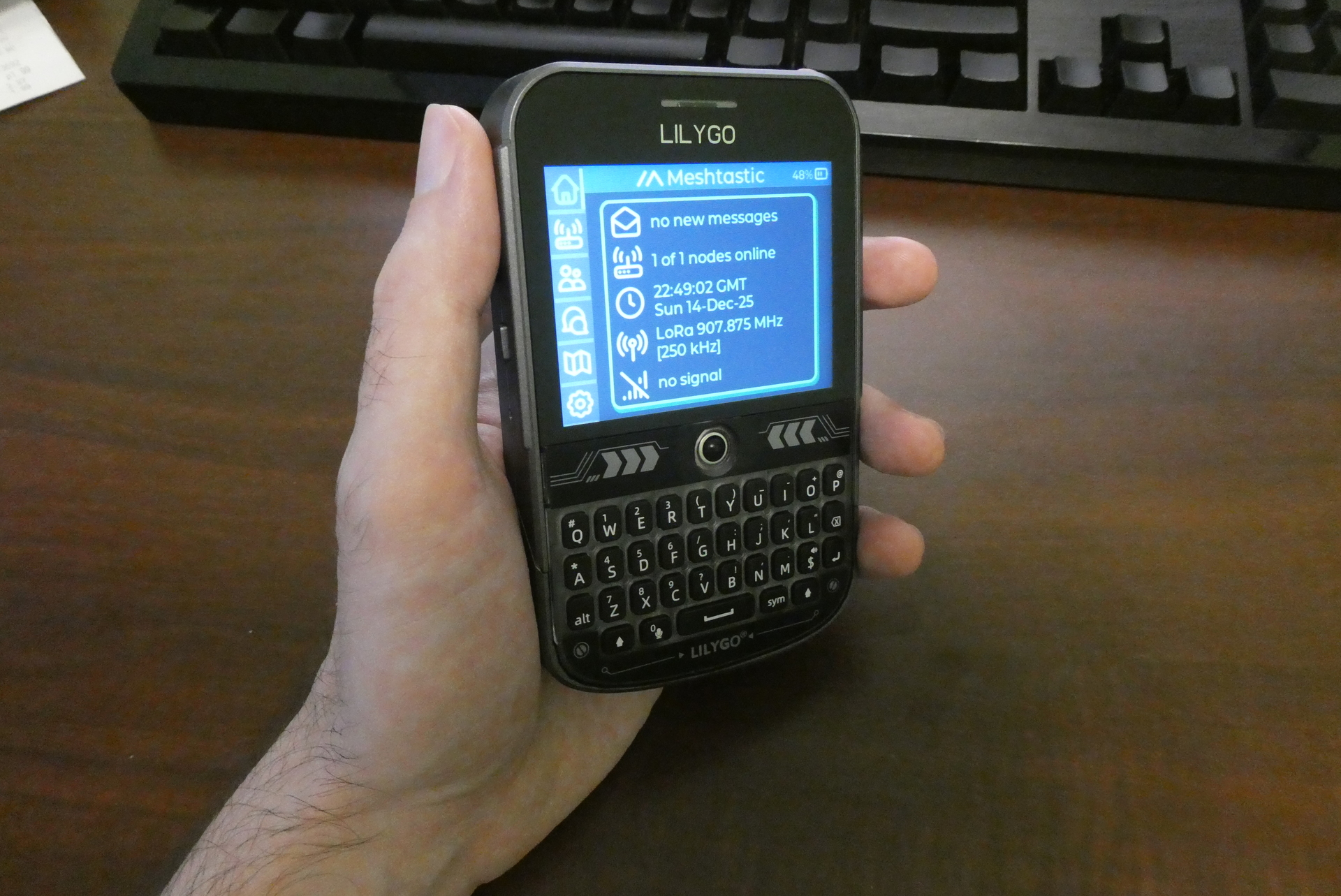
With the tricky high-speed digital and analog circuitry for radio interfacing encapsulated into pre-certified modules, it became easy for small-scale hardware vendors to integrate it into development boards and even standalone gadgets for experimentation. On the software side, the two projects I came across so far are MeshCore and Meshtastic. So far I'm not sure about their differences; possibly the second has more buzz going at the moment, but I expect I'll just try both and find out quickly enough. So far I've ordered two types of node: the Heltek v3 which provides minimal user interface and needs to pair with an external application for control, such as over Bluetooth or USB, and the LilyGo T-Deck Plus as fully standalone mobile device with battery, physical keyboard, GPS module and display, which might manage to replace a phone at least for local logistics -- cool people only, of course.
The spectacularly beautiful part, in theory: no SIM card, no IMEI, no "baseband" modem processor snooping on things outside of operating system control, no monthly payment, no carrier infrastructure dependence, no planned obsolescence, minimal border crossing headaches, no constant location broadcasting (unless you want that), and no bureaucrats demanding you upload your precious bodily fluids for the privilege of patronizing their shitty network.
The mesh networks claim to implement text messages with both public and encrypted channels. I'd consider the crypto implementations suspect until proven otherwise, entropy sources especially, but perhaps no worse than cell phones generally, at least, or quite possibly better since it's end to end.
In short: for a modest one-time cost, you get something with plenty of upside and basically no downside; it probably won't be able to replace your phone altogether, but it makes an undemanding backup at the very least, that will keep on working even when nothing else does, while showing significantly more respect for your freedom and privacy, as a matter of factual implementation rather than propaganda.
But does it work, too?
~~~
I started with the T-Deck Plus as it was the first to arrive. The LilyGo store offers variants preloaded with MeshCore or Meshtastic, but I went with a plain LilyGo firmware, mostly because it's what was in stock for fast Amazon shipping rather than waiting on some slow boat from China for a first test. I'll need to be able to install firmware myself anyway, otherwise what's the use of having the source code?
That LilyGo firmware doesn't really do anything useful - it lights up, shows a splash screen, a mechanical voice says "Hello Lily Go" on the speaker, then it shows some settings with a laggy duck-shaped cursor. Changes don't survive a reboot and you can't send messages. From a look at the code on github, it's really just a basic feature demo for a developer board.
So I went to try Meshtastic. They have a documentation tree with fancy web design aplenty, though information is a little scattered. They push a Chrome based web flasher (ugh), but there's also a CLI route ; the page demands JS to show the Linux version (ugh #2). Source code is on github (ugh #3).
Plugging the device into Ubuntu by USB-C, it shows up in dmesg as "USB JTAG/serial debug unit", then "cdc_acm 1-2:1.0: ttyACM0: USB ACM device"; in effect it's a serial adapter. They want you to pip3 install esptool, sight unseen (ugh #4), but it's available from the Ubuntu repos so I apt-get installed it. In any case it requires python3 (ugh #5). I tried the first sanity check:
$ esptool chip_id
It probed a bunch of nonexistent serial ports (thanks udev...?), then found the right one OK, then barfed.
Serial port /dev/ttyACM0
Connecting...
Detecting chip type... ESP32-S3
Chip is ESP32-S3 (QFN56) (revision v0.2)
Features: WiFi, BLE, Embedded PSRAM 8MB (AP_3v3)
Crystal is 40MHz
MAC: xx:xx:xx:xx:xx:xx
Traceback (most recent call last):
  File "/usr/bin/esptool", line 37, in <module>
	esptool._main()
  File "/usr/lib/python3/dist-packages/esptool/__init__.py", line 1139, in _main
	main()
  File "/usr/lib/python3/dist-packages/esptool/__init__.py", line 751, in main
	esp = esp.run_stub()
	  ^^^^^^^^^^^^^^
  File "/usr/lib/python3/dist-packages/esptool/loader.py", line 996, in run_stub
	stub = StubFlasher(get_stub_json_path(self.CHIP_NAME))
	   ^^^^^^^^^^^^^^^^^^^^^^^^^^^^^^^^^^^^^^^^^^^^^^^
  File "/usr/lib/python3/dist-packages/esptool/loader.py", line 159, in __init__
	with open(json_path) as json_file:
	 ^^^^^^^^^^^^^^^
FileNotFoundError: [Errno 2] No such file or directory: '/usr/lib/python3/dist-packages/esptool/targets/stub_flasher/stub_flasher_32s3.json'
I got an idea pretty quickly of what that missing "stub flasher" nonsense is, but it may take some explaining. See, any chip that has some writable memory on it, such as a microcontroller or otherwise embedded system which holds its own programming ("firmware"), obviously needs some mechanism to write to that memory from outside ("flashing"). With systems designed by sane people (such as my PIC12/PIC16 of design dating to the 1970s), this flashing can be done without support or permission from the pre-existing code; in other words, it requires no knowledge of nor trust in that prior code, and the process is forgiving, with no possibility of "bricking" the device by a coding mistake.
But we're living in lazy modern times and convenience is the foremost god worshipped by engineering, management and customers alike; therefore, everything must be done using at most one USB cable (and preferably none at all). But USB involves a highly complex protocol, meaning some level of operating system and driver support is required on the device side in order to communicate with a host computer. Espressif's solution for their ESP32 is a multi-stage bootloading process, with a minimal first stage permanently stored in the chip which supposedly cannot be overwritten. It brings up USB communications and should be able to flash the chip, except it's not the fastest implementation and may come with bugs or other unspecified limitations. So you're supposed to use it only for uploading a temporary program into memory which then implements the fully-functional second stage.(iii)
The esptool script that everyone points you to - which was of independent origin but later adopted/hijacked by Espressif themselves - duly implements that dance, but apparently the blob has been removed here, perhaps for Debian purity reasons or who knows what. So, in hopes that maybe it's not really needed, I found how to turn it off, along with skipping the probing spam by specifying the proper serial port, and got much cleaner output:
$ esptool -p /dev/ttyACM0 --no-stub chip_id
esptool.py v4.7.0
Serial port /dev/ttyACM0
Connecting...
Detecting chip type... ESP32-S3
Chip is ESP32-S3 (QFN56) (revision v0.2)
Features: WiFi, BLE, Embedded PSRAM 8MB (AP_3v3)
Crystal is 40MHz
MAC: xx:xx:xx:xx:xx:xx
Enabling default SPI flash mode...
Warning: ESP32-S3 has no Chip ID. Reading MAC instead.
MAC: xx:xx:xx:xx:xx:xx
Hard resetting via RTS pin...
I recall this worked OK even with the LilyGo demo booted, but there's a process to manually enter firmware download mode: hold the trackball button while switching it on (they say 2-3 seconds) then release. It worked for me as the backlight stayed off, not booting into the demo.
Next was to download the firmware binaries (not even trying to build from source yet, which I'm sure will be a whole other ordeal). I navigated to their github releases/assets page (ugh #6) and found a firmware-esp32s3-2.7.15.567b8ea.zip. The instructions didn't mention anything about unzipping: they just tell you to cd to "the directory where your firmware was downloaded", with example of "~/Downloads/firmware-esp32s3-X.X.X.xxxxxx/" as if it just magically extracted itself. So I filled in with the missing "unzip" command and it... exploded all over my working directory with 140 different files, no such versioned subdirectory to be found, until I cleaned up and created that too (ugh #7). Inside, there's a different firmware image for each of a variety of supported boards, usually with a "firmware-*.bin" and "firmware-*-update.bin" variant for whatever reason, along with "littlefs-*.bin" files whatever those are. Thus they got the zip download bloated to 123 MB but I'm sure there's a long ways yet for that to grow.
Speaking of littlefs mysteries, I did find their "Glossary of Terms"; it was of no help on the matter, nor on MUI or TFT, but it did confirm my suspicions about OTA (ugh #8).
I was then admonished to choose the correct firmware file for my board, and of course there's none in the list that clearly matches "T-Deck Plus"; I went out on a limb to guess that plain "t-deck" would be close enough but then had to wonder what the "-tft" variant was about. I'm old enough to have guessed something display related (active matrix, man!) but as far as I knew all the T-Deck models have displays of some sort. I found a bit more context from a blog and finally the required enlightenment under Device UIs which confirmed that -tft means Meshtastic UI aka MUI, which should provide the most fully functional interface for a freestanding device with sizable display.
I skimmed through and then ran their device-install.sh script, which demands Bash and also doesn't work (ugh #9):
$ ./device-install.sh -p /dev/ttyACM0 -f firmware-t-deck-tft-2.7.15.567b8ea.bin
Trying to flash firmware-t-deck-tft-2.7.15.567b8ea.bin, but first erasing and writing system information
usage: esptool [-h] [--chip {auto,esp8266,esp32,esp32s2,esp32s3beta2,esp32s3,esp32c3,esp32c6beta,esp32h2beta1,esp32h2beta2,esp32c2,esp32c6,esp32h2,esp32p4}] [--port PORT] [--baud BAUD]
	       [--before {default_reset,usb_reset,no_reset,no_reset_no_sync}] [--after {hard_reset,soft_reset,no_reset,no_reset_stub}] [--no-stub] [--trace]
	       [--override-vddsdio [{1.8V,1.9V,OFF}]] [--connect-attempts CONNECT_ATTEMPTS]
	       {load_ram,dump_mem,read_mem,write_mem,write_flash,run,image_info,make_image,elf2image,read_mac,chip_id,flash_id,read_flash_status,write_flash_status,read_flash,verify_flash,erase_flash,erase_region,merge_bin,get_security_info,version}
	       ...
esptool: error: argument operation: invalid choice: 'erase-flash' (choose from 'load_ram', 'dump_mem', 'read_mem', 'write_mem', 'write_flash', 'run', 'image_info', 'make_image', 'elf2image', 'read_mac', 'chip_id', 'flash_id', 'read_flash_status', 'write_flash_status', 'read_flash', 'verify_flash', 'erase_flash', 'erase_region', 'merge_bin', 'get_security_info', 'version')
But of course: that esptool, which they decline to distribute, hasn't made up its mind on standard spellings, quite in keeping with the Python 3 choice I'd say. Even funnier, device-install.sh itself uses both hyphen and underscore variants of the same write-flash! So I corrected them all to underscores, again hit the stub flasher failure and edited again to add the --no-stub, and then:
Enabling default SPI flash mode...
Erasing flash (this may take a while)...

A fatal error occurred: ESP32-S3 ROM does not support function erase_flash.
Rumors suggest that this is due to the missing stub flasher... meaning the builtin bootloader is trash indeed.
Since I'm forced after all to pick out and install my own esptool, I took a look around its git history, noting a few major events including: the Espressif takeover; introduction of Python 3 compatibility followed by quiet deprecation and removal of Python 2 support; the stub flasher code splitting out into a separate repository; that repository being nominally deprecated in favor of a new Rust implementation; then even that favored one showing up now as 'archived' ?!
In possible alternatives, I noted that there's a C library called esp-serial-flasher, intended for building your own flasher to run on other microcontrollers or platforms otherwise too constrained for Python; unfortunately there's no POSIX targetted application ready to go.
Rather than going for the unspecified-latest esptool as the instructions were pushing me, I instead went back in the history to the last version with Python 2.7 support: esptool-3.3.3. For added bonus, that version still includes the stub flashers, complete with base64 blobs directly in esptool.py. We'll now continue straight from the lab notebook:
- Tried "python setup.py install --user", using my python2 package from Gales;(iv) it failed due to missing setuptools.
- Tried Ubuntu's python3 again; it got farther, then downloaded some reed-solomon library from the network without permission, which in turn blew up with a large and not readily helpful traceback.
- Recalled that I'd closed that security hole in the Gales setuptools port, so installed that too and went back to python2. Installation completed with a nice refusal of its attempt to download a "bitstring" package. Unfortunately the installed script won't run without it; or running directly from the tree, it first hits a missing "serial" package.
- Back to python3 then, maybe I can force it to use the dependency versions available from ubuntu. Commented out the 'reedsolo' line in setup.py install_requires. So far so good... but the python fuckers just can't help themselves; just running esptool.py prints "DeprecationWarning: pkg_resources is deprecated as an API." But works for chip_id, even without the --no-stub.
HAH! Flashing successful.
$ ./device-install.sh -p /dev/ttyACM0 -f firmware-t-deck-tft-2.7.15.567b8ea.bin
Trying to flash firmware-t-deck-tft-2.7.15.567b8ea.bin, but first erasing and writing system information
esptool.py v3.3.3
Serial port /dev/ttyACM0
Connecting...
Detecting chip type... ESP32-S3
Chip is ESP32-S3 (revision v0.2)
Features: WiFi, BLE
Crystal is 40MHz
MAC: xx:xx:xx:xx:xx:xx
Uploading stub...
Running stub...
Stub running...
Erasing flash (this may take a while)...
Chip erase completed successfully in 6.3s
Hard resetting via RTS pin...
esptool.py v3.3.3
Serial port /dev/ttyACM0
Connecting...
Detecting chip type... ESP32-S3
Chip is ESP32-S3 (revision v0.2)
Features: WiFi, BLE
Crystal is 40MHz
MAC: xx:xx:xx:xx:xx:xx
Uploading stub...
Running stub...
Stub running...
Configuring flash size...
Flash will be erased from 0x00000000 to 0x0036dfff...
Compressed 3593792 bytes to 2029284...
Wrote 3593792 bytes (2029284 compressed) at 0x00000000 in 17.6 seconds (effective 1632.4 kbit/s)...
Hash of data verified.

Leaving...
Hard resetting via RTS pin...
Trying to flash bleota-s3.bin at offset 0x650000
esptool.py v3.3.3
Serial port /dev/ttyACM0
Connecting...
Detecting chip type... ESP32-S3
Chip is ESP32-S3 (revision v0.2)
Features: WiFi, BLE
Crystal is 40MHz
MAC: xx:xx:xx:xx:xx:xx
Uploading stub...
Running stub...
Stub running...
Configuring flash size...
Flash will be erased from 0x00650000 to 0x006cbfff...
Compressed 506704 bytes to 309044...
Wrote 506704 bytes (309044 compressed) at 0x00650000 in 2.6 seconds (effective 1553.9 kbit/s)...
Hash of data verified.

Leaving...
Hard resetting via RTS pin...
Trying to flash littlefs-t-deck-tft-2.7.15.567b8ea.bin, at offset 0xc90000
esptool.py v3.3.3
Serial port /dev/ttyACM0
Connecting...
Detecting chip type... ESP32-S3
Chip is ESP32-S3 (revision v0.2)
Features: WiFi, BLE
Crystal is 40MHz
MAC: xx:xx:xx:xx:xx:xx
Uploading stub...
Running stub...
Stub running...
Configuring flash size...
Flash will be erased from 0x00c90000 to 0x00feffff...
Compressed 3538944 bytes to 3781...
Wrote 3538944 bytes (3781 compressed) at 0x00c90000 in 7.9 seconds (effective 3591.5 kbit/s)...
Hash of data verified.

Leaving...
Hard resetting via RTS pin...
Nothing happened afterward, so I tapped the reset button and up it came!
There's a region selector... and as I scroll through the options, it disappears. But found it easily enough in settings; set US region(v) and it rebooted.
So far, the UI is heavy on visual design but clunky and not quite self-explanatory. GPS works, once enabled, including date and time; map tiles can be installed separately, by microSD card. Time and altitude readings seem unstable, though. As for the T-Deck hardware, the feel is not luxurious but actually pretty sturdy so far. It's portable enough, though certainly not thin or waterproof, and has a rather exposed hardware reset button on one side and power switch on the other. Not sure yet if there's any reason to do an orderly OS shutdown first or just switch it off. Looks like a plain Philips-head jeweler's screwdriver should be enough to open it.
I've been using the default "LongFast" modem preset and frequency slot 24. So far my node hasn't found any neighbors but let's see if we can't change that!
- A RadioShack crystal kit in the basement with various attempted homemade antennae running up the stairway, a transistor amplifier of design lifted from somewhere on the 'net soldered together in a teabox, struggling to comprehend any of the schematics from a hand-me-down American Radio Relay League handbook... normal 90's kid stuff, right? [^]
- If it's per device, then logically you'll just buy ten of whatever minimum hardware component passes for "device", or optimize it to a single unit that simulates the same. [^]
- Then again, since the actual communication appears to use plain serial protocol, it's possible the USB drivers thing is just an excuse I hallucinated in the search for some kind of explanation for the sadness. [^]
- Ubuntu no longer provides Python 2 at all, but due to static linking and smart packaging, the Gales binary package installs without conflict and runs flawlessly. [^]
- 902-928 MHz; I couldn't find an authoritative source online but at least The Things Network lists it for Panama at Frequency Plans by Country. [^]
Sounds like quite the dig, glad to hear it did work out in the end.
Fwiw, that exploding zip + littlefs seems likely to be some embedded file system. Those were at some point all the rage and I think they've been coming back via all the various environments that aim for some sort of prepackaged "whole" (I wouldn't be surprised if docker and similars use something of the sort too). So possibly the unzip step wasn't necessarily missing, if the thing simply works with the .zip file as a "packaged whole including its own little filesystem" directly.
Comment by Diana Coman — 2025-12-15 @ 08:28
@Diana Coman: the instructions literally said to cd into a directory which didn't exist. The device-install.sh as well as the firmware & littlefs images for a variety of boards are all inside the zip file, so if it's indeed supposed to do something in-place it's entirely unclear what's the program that would be doing it. But yes, I expect littlefs is a filesystem for the embedded device itself.
Comment by Jacob Welsh — 2025-12-16 @ 01:42
For an update on this, we got some Heltec nodes built too and so can now confirm that the system does work at least to some degree; their range so far is not great but better than the Lilygo's which is almost nonexistent. We've picked up signals from around 8 other nodes around town, on LongFast frequency slot 20, of which one so far has responded to a basic hello, but connectivity is quite intermittent.
Comment by Jacob Welsh — 2026-03-25 @ 03:56